Trending Shri Krishna VN Qr Codes Template 2026
ADVERTISEMENT

If you want to create a viral, divine, and highly aesthetic Shri Krishna transformation video for Instagram Reels, you don't need complex video editing software. By combining an AI image generator with a verified vn template code, you can turn a basic video clip into a stunning, high-definition Krishna avatar transition in just a few minutes.
Follow this easy, step-by-step guide to generate your personalized Krishna AI photo and apply the vn template for reels configuration seamlessly.
🛠️ Step-by-Step Tutorial: How to Make the Reel
Record Your Base Video: Shoot a short video of yourself (walking, standing, or posing) and take a clean screenshot of the exact frame where you want the transformation to happen.
Copy the AI Prompt: Copy the detailed Shri Krishna AI Photo Prompt provided in the section below.
Generate Your AI Image: Open any advanced AI tool like ChatGPT or Google Gemini, upload your screenshot as a reference photo, paste the copied prompt, and hit generate.
Download the Output: The AI will transform your outfit, complexion, and crown into a realistic Shri Krishna look while preserving your exact face, pose, and background. Save this image to your phone's gallery.
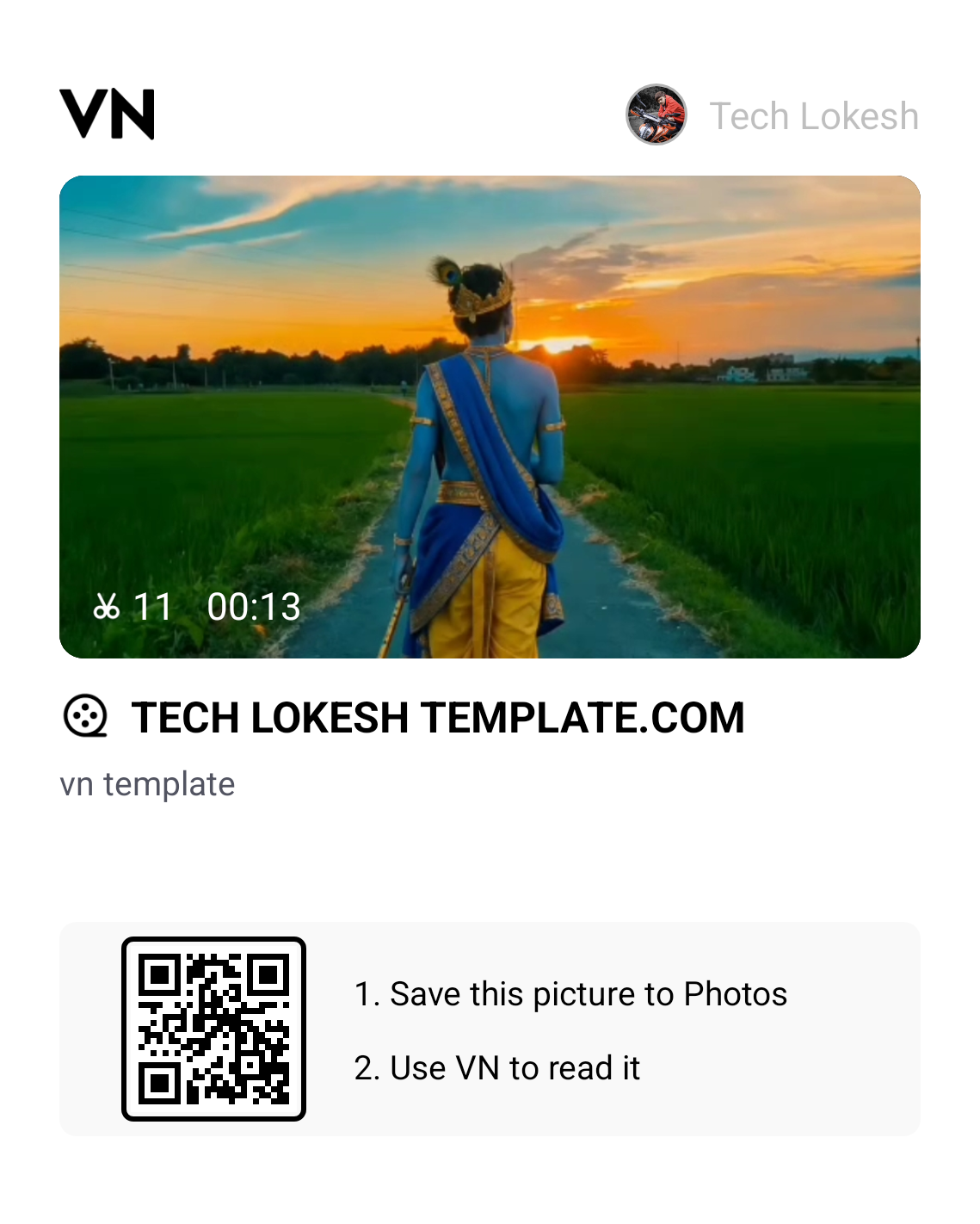
Get the VN QR Codes Graphic: Take a screenshot of the official vn qr codes image provided on this page.
Scan & Import Media in VN App: Open the VN Video Editor app, tap the Scan icon at the top right, and upload the vn qr codes screenshot.
Select Assets: Tap Use Template and select your original video along with the AI-generated Krishna photo from your gallery.
Export in High Quality: Let the app automatically sync the beat transition, then export your final video with the following recommended settings:
Resolution: 1080p
Frame Rate (FPS): 30 FPS or 60 FPS
Format: MP4
See How Your Video Looks After Editing! 👇
ADVERTISEMENT
🎨 Official Shri Krishna AI Photo Prompt
Copy and paste the exact prompt below into ChatGPT or Google Gemini along with your uploaded screenshot:
AI PROMPT
Use my uploaded photo as the exact base/reference image. Preserve the original photograph and composition as much as possible.
Transform ONLY the person’s appearance into a highly realistic Shri Krishna-inspired traditional look.
IMPORTANT: – The person must remain the exact same person. – Preserve the original face, facial features, identity, expression, hairstyle, hair texture, body shape, height, proportions, pose, hands, fingers, legs, camera angle, framing and perspective. – Preserve the original photographic realism, lighting, shadows and depth of field. – DO NOT modify the background in any way. Keep the original road, trees, buildings, signs, sky, wires, vehicles, objects and scenery exactly unchanged. – Do not add or remove anything from the environment.
ONLY change the person’s appearance:
Change the visible skin/body complexion to a natural, realistic deep Krishna-inspired blue complexion while retaining realistic skin pores, texture and natural highlights.
Replace the existing outfit with an elegant traditional Krishna costume: – rich golden-yellow dhoti – realistic fabric folds and texture – royal-blue decorative drape – intricate traditional golden embroidered borders
Add authentic, elegant Krishna-style traditional jewelry: – layered gold necklaces – armlets – bracelets – waist ornament – traditional earrings – subtle additional golden ornaments
Add a beautiful traditional Krishna mukut/crown with detailed gold craftsmanship and one prominent natural peacock feather.
Add a traditional wooden flute naturally in the person’s hand/alongside the body ONLY if it can be done without changing the original pose, hands or fingers.
CRITICAL FOOTWEAR REQUIREMENT: – ABSOLUTELY NO FOOTWEAR. – Remove/replace the original shoes completely. – The person must be completely barefoot. – Both feet and all toes should look natural, anatomically correct and realistic. – Do not add sandals, shoes, slippers, socks, anklets that look like footwear, or any other footwear. – Preserve the original walking pose and leg position while making the feet naturally barefoot.
STYLE: Photorealistic real-life photograph, not painting, not illustration, not CGI, not cartoon, not fantasy render. Realistic Indian traditional styling, authentic fabric texture, realistic gold jewelry reflections, natural skin texture, physically accurate lighting and shadows, seamless clothing transformation, highly detailed, natural photographic finish.
MOST IMPORTANT: Do not alter the original background or composition. Do not change the person’s identity or pose. Only transform the person’s skin color, clothing and traditional Krishna accessories, with completely bare feet.
Trending Shri Krishna Janmashtami VN Template Code Download 2026
If you are looking to create a divine, high-energy, and deeply aesthetic video for your next social media upload, the Shri Krishna transition trend is an exceptional choice right now. This trending divine layout is currently blowing up across Instagram Reels, with lakhs of creators actively using it to post their daily Janmashtami status edits and devotional reels, making it the most viral vn template for reels on the platform today. Featuring powerful devotional beats paired with modern velocity drops, this specialized vn template code helps you showcase beautiful Krishna idols, temple visits, or personal spiritual moments with maximum impact. Today, we are sharing the clean vn code template configuration on vnqrcodes.in to make your mobile video editing process smooth and effortless.
We personally tested this divine vn template for reels setup on our team devices, and the timing works amazingly well for creators who want sharp visual transitions. The layout features advanced, lightning-fast image transition effects that shift seamlessly on every heavy dhol and flute beat drop, paired with soft light leaks and subtle camera shake effects. By choosing this updated layout from vnqrcodes.in, you can bypass hours of manual timeline slicing and grab a free vn qr code download asset to generate a studio-grade video in just a single click.
Why People Love This Shri Krishna Template
Instead of spending your valuable free time manually chopping clips, setting complex velocity curves, and trying to align fast transition cuts to devotional music drops, this vn code template handles all the technical steps for you. Here are the real, practical benefits you get when downloading this asset from vnqrcodes.in:
Flawless Devotional Beat Sync: The layout cuts your photos and video clips perfectly to the rhythm of the flute and heavy dhol drops.
Dynamic Image Transitions: Features clean camera zooms, directional snap cuts, and gentle light flash shifts pre-programmed into the timeline.
Warm Spiritual Color Grading: The vn template code automatically applies a rich, warm golden color filter that makes temple photos and deity shots look divine.
Zero App Watermarks: Once you finish compiling your media with these verified vn qr codes, your exported video will look completely clean without any random branding icons.
Full HD Output: It allows you to save the final file in crisp high resolution directly from vnqrcodes.in, ensuring your video quality stays perfectly sharp on mobile screens.
⚠️ Quick Tip for Best Results from vnqrcodes.in: Because this divine layout relies on fast beat transitions and light effects, select your highest-quality portrait photos of Lord Krishna or your generated AI Krishna photo so the visual transitions look crisp and beautifully focused.
What is a VN Code Template?
A vn code template is a pre-made project layout where an experienced creator has already mapped out the technical timing, speed curves, filter layers, and transition points for a specific track. Instead of spending hours learning complicated desktop video editing programs or manual framing from scratch, mobile creators use these shared vn qr codes as a smart shortcut to achieve a polished look in seconds. You simply scan the shared code graphic, drop in your own media assets, and the application builds the video layout automatically. At vnqrcodes.in, we verify every single file so you always get a fast, working free vn qr code download.
Frequently Asked Questions (FAQs)
Q1. Is this free vn qr code download completely free for creators?
Yes, all the mobile layouts, custom configurations, and vn qr codes shared on our platform vnqrcodes.in are 100% free for the creator community to use.
Q2. Which AI tools work best with this prompt?
Both ChatGPT (DALL-E 3) and Google Gemini work exceptionally well for preserving your original facial features, body pose, and background while changing clothing and accessories.
Q3. What should I do if the QR image fails to scan inside the app?
If your editor shows a scanning error with the vn qr codes, make sure the downloaded graphic isn't cropped, blurry, or low-resolution. If it is clean, simply update your VN app to the latest version to support the newer vn template for reels formats.
Conclusion
If you want to create an impactful, divine, and high-energy Janmashtami reel that stands out with modern motion transitions and rich music sync, this specific vn template code is definitely worth trying out. Just copy the AI prompt, scan the verified vn qr codes from vnqrcodes.in, add your generated photo, and your aesthetic video will be completely ready to post in a few moments. Make sure to check out our comprehensive VN QR Codes Template List or explore the latest updates on our Viral VN Codes hub page daily for new editing setups!
ADVERTISEMENT
🔥 Trending for You
Viral Couple Coffee Mess AI Video Prompt 2026 | Google Flow Kitchen Trend Edit
Meri Nas Nas Mein Bahe Hai AI Video Editing Prompt 2026 | Viral Glowing Veins Name Edit
Viral Girls Cricket Shot AI Video Prompt 2026 | Google Flow Village Cricket Edit
Happy Karwa Chauth Special 5 Grid Photo VN Template Code 2026
Karwa Chauth Special VN QR Codes Download 2026 | Trending Couple Reel Edit