Meri Nas Nas Mein Bahe Hai AI Video Editing Prompt 2026 | Viral Glowing Veins Name Edit
ADVERTISEMENT
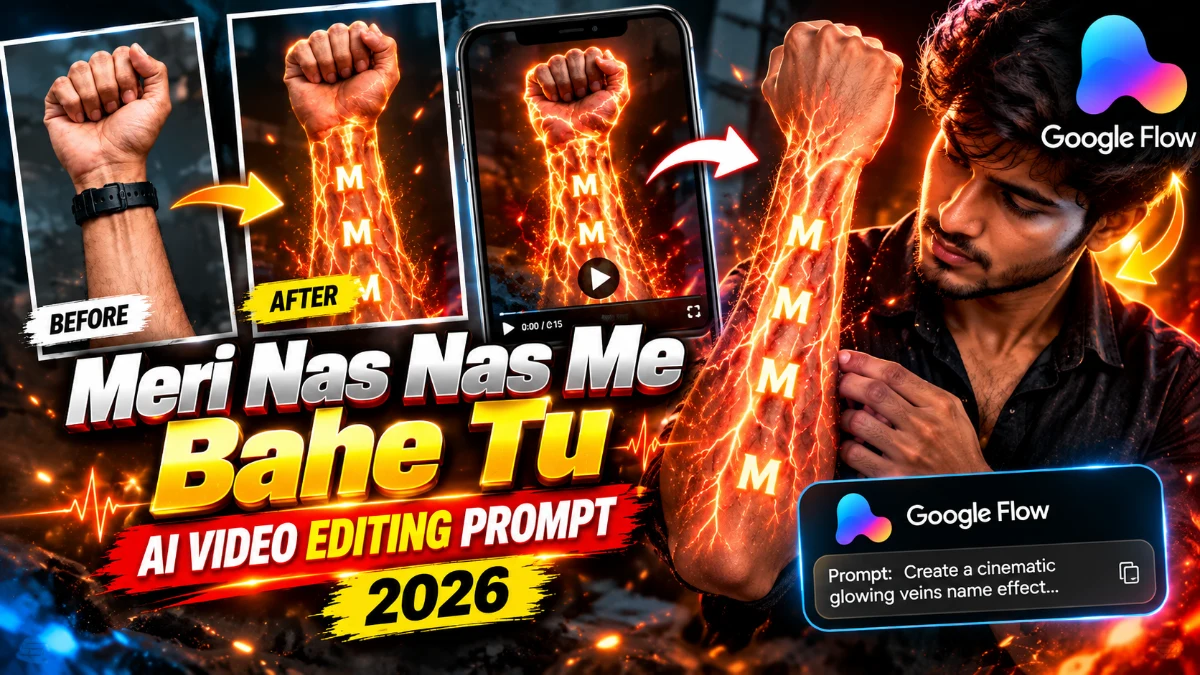
The glowing veins name trend is going completely viral on Instagram Reels right now. The edit opens with a normal pen sketch of an initial letter drawn on a person's wrist. Once the trending track "Meri Nas Nas Mein Bahe" hits the bass drop, the internal veins light up like glowing golden neon and trace the name with fiery energy. Making this visual effect manually in editing software takes hours of masking and VFX work. Using Google Flow AI and the right text prompt, you can generate this viral video in 1-click. Today on vnqrcodes.in, we are providing the tested AI prompt and complete generation guide for free.
Our team tested this prompt in Google Flow to ensure sharp skin detail and realistic glowing light effects. It works best with close-up wrist shots taken in dim lighting. By following our verified workflow on vnqrcodes.in, you can produce clean HD reels ready for social media.
Why Choose This Glowing Veins AI Video Prompt?
This automated Google Flow setup offers a quick way to create eye-catching visuals without advanced editing:
Glowing Vein Reveal: Transforms handwritten pen marks into radiant, flowing neon veins.
Custom Name Initials: Works with any alphabet or symbol drawn on the hand.
Natural Skin Physics: Preserves realistic shadows, skin textures, and light reflections.
Full 9:16 Vertical Ratio: Tailored directly for Instagram Reels and YouTube Shorts.
Accurate Beat Sync: Matches the dramatic bass drop of trending Hindi audio tracks.
Quick Tip from vnqrcodes.in: Draw your initial neatly on your wrist and take a sharp close-up photo in warm or dim lighting for the best glow effect.
ADVERTISEMENT
Ready-to-Use Glowing Veins AI Prompts
Copy either of these tested prompts to paste into your AI tool:
Prompt 1: Golden Glowing Veins (Best for Aesthetic Look)
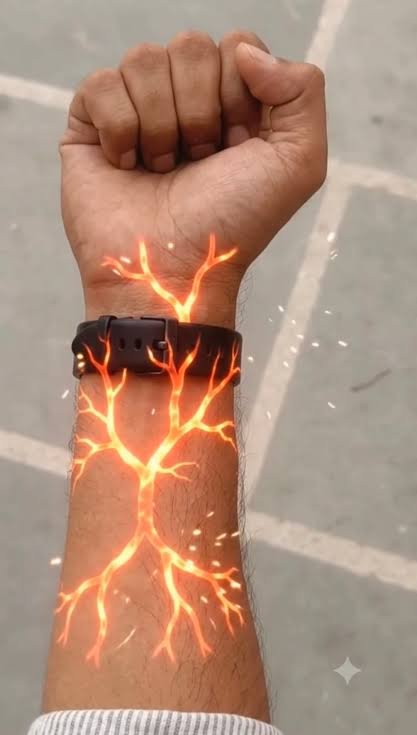
AI PROMPTSTRICT HAND & VISUAL IDENTITY LOCK: Use the uploaded hand image as the ONLY visual reference. Preserve the exact hand shape, closed fist, finger positions, skin tone, natural skin texture, arm hair, sleeve, wristwatch design, and original background. Do not replace or modify the hand or accessories.
Create an ultra-realistic 10-second cinematic VFX video featuring a seamless transformation from the original hand into a glowing red-orange sci-fi biological tunnel filled with floating 3D letters.
CUSTOM LETTER: --- ENTER YOUR LETTER HERE----
Use only this selected single English alphabet letter throughout the tunnel sequence. Maintain its exact shape and consistency.
Scene & Motion Timeline:
0–2 Seconds — Original Hand: Begin with the exact uploaded hand and forearm, maintaining the closed fist, wristwatch, clothing, and background. A faint red-orange glow gradually appears beneath the wristwatch, followed by thin luminous energy branches spreading naturally along the forearm.
2–4 Seconds — Glowing Energy Veins: The branching lines expand into an intricate, tree-like network beneath the intact skin. Bright red-orange cores, soft glowing edges, subtle energy pulses, and tiny sparkling particles create a realistic fictional sci-fi effect. No wounds or skin damage.
4–5 Seconds — Cinematic Transition: The camera smoothly pushes toward one glowing branch on the wrist. Follow the luminous pathway into an extreme close-up, seamlessly transitioning from the realistic forearm into an immersive CGI microscopic tunnel without abrupt cuts.
5–7 Seconds — Internal Energy Tunnel: Reveal a deep, three-dimensional red-orange biological-inspired tunnel featuring translucent flowing strands, circular energy waves, glowing particles, and floating sparks. The camera travels continuously forward with realistic depth, smooth parallax, volumetric lighting, and cinematic motion blur.
7–10 Seconds — Floating 3D Letters: Multiple luminous copies of --ENTER YOUR LETTER HERE-- appear throughout the tunnel at different depths and sizes. Each letter features a pale-orange glowing outline, subtle golden highlights, and realistic 3D depth. Some letters slowly rotate and drift past the camera while others float deeper inside the tunnel. Keep every letter correctly shaped, readable, and identical.
Camera & Visual Quality: Smooth continuous cinematic camera movement, realistic opening footage, seamless macro-to-CGI transition, detailed red-orange energy effects, volumetric illumination, atmospheric particles, natural motion blur, HDR, and premium photorealistic VFX.
Audio: Deep cinematic electronic ambience, subtle pulsing energy sounds, a gradually rising sci-fi hum, and a smooth futuristic whoosh during the tunnel transition. Synchronize sound effects with the visuals. No dialogue or voice-over.
Negative Prompt: Altered hand, changed wristwatch, open fist, extra fingers, distorted anatomy, changed background, blood, wounds, damaged skin, abrupt cuts, shaky camera, unrealistic transitions, incorrect letters, mixed alphabets, numbers, unreadable typography, captions, logos, or watermarks.
Final Output: 10 seconds, vertical 9:16, ultra-realistic cinematic VFX, smooth continuous motion, and a glowing red-orange tunnel containing only the selected 3D letter.
Prompt 2: Fiery Electric Veins (High Energy Look)
AI PROMPTCreate a cinematic, ultra-realistic visual-effects video using the uploaded hand image as the exact visual reference. DURATION: 10 seconds. FORMAT: Vertical 9:16. STYLE: Photorealistic hand combined with cinematic red-orange sci-fi biological visual effects. CUSTOMIZABLE LETTER: The letter to display throughout the internal tunnel is: --- ENTER YOUR LETTER HERE----. Replace --- ENTER YOUR LETTER HERE--- with any single English alphabet letter, such as A, R, P, S, or M. Use the selected letter consistently throughout the video. HAND AND ARM: Use the uploaded image as the exact reference for the hand and arm. Preserve the original skin tone, hand shape, finger positions, wrist, visible arm hair, sleeve, clothing, wristwatch, and background. Do not replace the hand with a different hand. Keep the original fist position and wristwatch design consistent with the uploaded image. SCENE AND ACTION: 0–2 SECONDS — ORIGINAL HAND: Show the uploaded hand and forearm in the same position as the reference image. The fist remains closed and the wristwatch is clearly visible. Keep the original background and natural lighting. A faint red glow begins appearing beneath the wristwatch. Thin, branching red-orange luminous lines gradually emerge from the wrist and spread along the forearm. 2–4 SECONDS — GLOWING VEINS: The glowing branches extend across the forearm in a symmetrical, tree-like network. The lines have bright red-orange cores, soft luminous edges, and tiny sparkling particles. Make the effect look like fictional cinematic energy travelling beneath the skin. Keep the skin intact and realistic, without wounds, blood, or damage. The glow becomes brighter and pulses gently. 4–5 SECONDS — CAMERA PUSH-IN: The camera smoothly moves closer to the glowing branches on the wrist and forearm. Follow one bright branch as it expands across the frame. Transition seamlessly from the real forearm into a fully CGI microscopic tunnel. The transition should feel like the camera is travelling inside a glowing biological pathway. 5–7 SECONDS — INTERNAL TUNNEL: Reveal a deep red-orange, three-dimensional tunnel inspired by a microscopic biological environment. The tunnel contains flowing translucent orange strands, circular wave patterns, glowing particles, and tiny floating sparks. The environment feels immersive, futuristic, and cinematic. The camera travels forward continuously through the tunnel with smooth depth and realistic parallax. 7–10 SECONDS — FLOATING LETTERS: Introduce the selected letter --- ENTER YOUR LETTER HERE---- inside the tunnel. Multiple copies of this exact letter appear at different distances and sizes, floating and slowly rotating in three-dimensional space. The letters have luminous pale-orange outlines, subtle golden highlights, and a soft glow that matches the surrounding environment. Some letters drift past the camera in the foreground while others remain deeper inside the tunnel. The camera continues travelling forward, creating a strong sense of depth and motion. Keep every letter readable and correctly shaped. Do not substitute other letters, numbers, words, or symbols. CAMERA: Begin with a close view of the original hand. Gradually push toward the wrist, follow the glowing branches, and transition into a continuous forward-moving tunnel shot. Use smooth cinematic motion, realistic depth of field, and natural motion blur. Avoid sudden cuts, shaking, or random camera movements. LIGHTING AND VISUAL EFFECTS: Use rich red and orange illumination, glowing vein-like branches, volumetric light, floating particles, subtle reflections, and cinematic contrast. Keep the opening hand realistic. Make the internal tunnel fully computer-generated and visually immersive. AUDIO: Use cinematic electronic ambience with a deep atmospheric hum, a rising energy sound during the glowing effect, and a smooth futuristic whoosh during the tunnel transition. Keep the sound synchronized with the visual changes. No dialogue or voice-over. STRICT RULES: Use the uploaded hand image as the original hand reference. Preserve the hand, wristwatch, clothing, and original background during the opening. Keep the fist closed and the hand shape consistent. The glowing effect must look fictional and cinematic. Transition smoothly from the forearm into the CGI tunnel. Use only the selected customizable letter. Keep the letter consistent throughout the tunnel. No additional words, captions, subtitles, or watermarks. No blood, wounds, or damaged skin. No unrelated scenes or objects. FINAL RESULT: A cinematic transformation from the uploaded hand into a glowing red-orange internal tunnel filled with floating, luminous 3D copies of the user’s selected letter.
Step-by-Step Guide: How to Generate Video in Google Flow
Open Google Flow and select the vertical 9:16 canvas size.
Upload the viral reference video in the Video Reference slot.
Upload your clear wrist photo with the initial in the Image Reference slot.
Paste the prompt into the prompt box.
Click Generate and download your finalized MP4 video once finished.
How to Sync Audio in VN Video Editor
Open VN Video Editor and import your downloaded AI video clip.
Tap Add Music, select Extract from Video, and extract audio from the original reel.
Align the audio waveform so the bass drop lands exactly when the veins begin glowing.
Export your reel in 1080p at 60FPS.
What is a Veins Name AI Prompt?
An AI prompt for veins name editing consists of text commands and motion parameters that direct generative AI to animate glowing vascular channels inside still hand photos. It enables creators to generate complex VFX reels in seconds without timeline keyframing.
Frequently Asked Questions (FAQs)
Q1. Is this veins name AI prompt free to use?
Yes, this prompt and all guides on vnqrcodes.in are 100% free.
Q2. Can I use any letter for this trend?
Yes, write any alphabet on your hand and the AI will shape the glowing veins around it.
Q3. Why is the glow effect blurry in my render?
Blurriness happens if the reference image is low resolution; use a well-lit, steady close-up photo.
Q4. Can I create this on a smartphone?
Yes, Google Flow works in mobile web browsers and VN Video Editor handles audio sync smoothly.
Conclusion
If you want an engaging, high-retention reel with viral appeal, this glowing veins trend is a must-try. Copy the prompt from vnqrcodes.in, run it in Google Flow, sync the music inside VN, and share your video! For more trending prompts, check our VN QR Code Template List and visit the Viral VN Codes page daily!
ADVERTISEMENT
🔥 Trending for You
Viral Girls Cricket Shot AI Video Prompt 2026 | Google Flow Village Cricket Edit
Happy Karwa Chauth Special 5 Grid Photo VN Template Code 2026
Karwa Chauth Special VN QR Codes Download 2026 | Trending Couple Reel Edit

Vo Bhi Apne Naa Hue VN QR Codes Download 2026 | Trending Sad Dialogue
Viral Tanne Meri Yaad Aavegi VN QR Codes Download 2026