Instagram Viral Toyota Car Stunt Flying AI Video Prompt 2026
ADVERTISEMENT
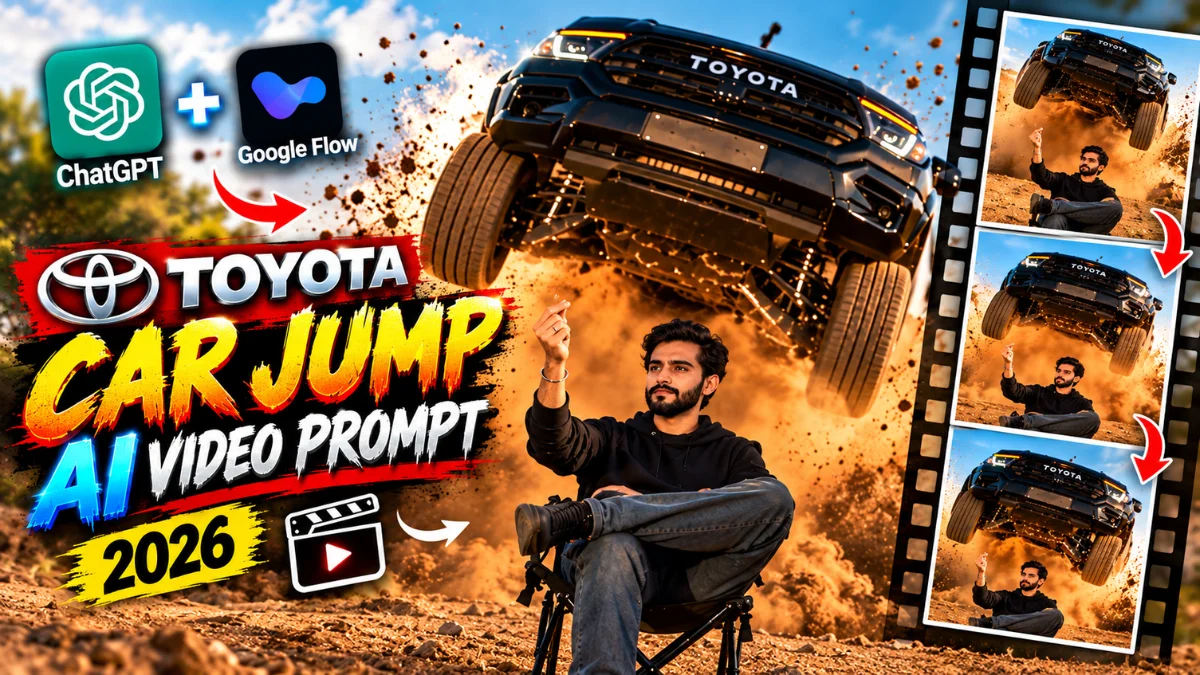
The Finger Snap Car Stunt trend is dominating Instagram Reels and Threads. The scene features a subject sitting calmly in a folding chair on open terrain, wearing sunglasses. With a simple snap of the fingers, a massive black Toyota off-road truck launches into the air from behind, kicking up heavy dust clouds. By generating a clean reference portrait in ChatGPT first, you can use Google Flow to animate the scene with realistic motion. Here are the verified master prompts and workflow.
This two-step process preserves facial identity while maintaining vehicle physics, dust dynamics, and slow-motion cinematic lighting.
Why This Snap Finger Car Stunt Video is Blowing Up
High-Retention Hook: The sudden transition from a calm seated posture to an airborne truck grabs viewer attention instantly.
Realistic Action Physics: Flying sand particles and suspension movement mimic big-budget movie stunts.
Cinematic Persona: The relaxed posture paired with extreme action creates a classic hero entry vibe.
Vertical 9:16 Framing: Built specifically for Instagram Reels, YouTube Shorts, and TikTok.
ADVERTISEMENT
2-Step Workflow: Image to Video Generation
Step 1 (Generate Base Image with ChatGPT): Open ChatGPT Image Creator, upload your real front-facing photo, and paste the Character Replace Image Prompt below to create your base 9:16 portrait seated in the chair.
Step 2 (Animate with Google Flow): Launch Google Flow AI, upload the generated image along with the reference stunt video, apply the Direct Video Prompt, and render your 12-second action sequence.
See How Your Video Looks After Editing! 👇

1. Toyota Car Stunt AI Image Prompt – Character Replace Prompt (For ChatGPT)
See How Your Video Looks After Editing! 👇
Upload your clear face reference photo into ChatGPT 4o or Bing Image Creator and use this exact prompt to generate your high-res base portrait:
AI PROMPT
Use the uploaded reference video as the EXACT motion, camera, timing, composition, environment, and action reference. Use the uploaded reference image of the person as the ONLY identity reference for the human subject. Replace the person in the reference video with the person from the uploaded reference image. The final person must preserve the uploaded person's identity with extremely high facial consistency throughout the entire video. IDENTITY LOCK: Preserve the exact face identity from the uploaded reference image. Do not redesign, beautify, or reinterpret the face. Keep the same facial structure, eyes, nose, lips, jawline, skin tone and natural facial proportions. The person must remain the same person in every frame. No face morphing, no identity drift, no face swapping artifacts. If the uploaded reference is a female, keep the person clearly female; if male, keep the person clearly male. Preserve natural hair characteristics from the reference image where visible. Do not change the person's age or facial appearance. IMPORTANT: The reference VIDEO controls the action and visual sequence. The reference IMAGE controls the person's identity and appearance. Do not copy the original person's face from the video. RECREATE THE VIDEO: Match the reference video's approximately 12-second sequence as closely as possible. Scene: A realistic outdoor dry grass/desert-like field during warm golden-hour sunlight. The person is sitting casually on a small folding camping chair in the foreground, with one leg crossed over the other. Beginning: Start with the same wide cinematic composition and slow camera movement as the reference video. The person is sitting calmly in the chair, looking toward the scene. Maintain the same body position and relaxed attitude. Middle: A large dark/black Toyota pickup truck suddenly enters the scene from behind the person and performs the same dramatic jump/drive-by action shown in the reference video. The truck kicks up a large amount of realistic dust behind and around it. The person remains seated in the chair and reacts naturally with subtle head and hand movement, following the same timing and body gestures as the reference video. Truck: Keep the same large dark Toyota pickup-truck appearance, proportions, aggressive front grille, headlights and realistic vehicle details visible in the reference video. Preserve the dramatic vehicle movement and dust interaction. Camera: Reproduce the reference video's cinematic camera language: vertical 9:16 framing, realistic telephoto/cinematic lens, shallow depth of field, natural background compression, smooth controlled camera movement, realistic focus changes, realistic motion blur, natural handheld/cinematic camera feel, no artificial camera shake. Ending: Finish with the person still sitting in the chair while the truck moves past behind them and dust settles around the scene. Match the final framing, expression and overall composition of the reference video. REALISM: Make it look like a real professionally filmed action scene, not AI-generated. Use: real human skin texture, natural facial details, realistic hair, realistic clothing fabric, natural sunlight, realistic shadows, realistic dust particles, realistic vehicle reflections, natural motion blur, realistic depth of field, cinematic dynamic range, natural highlight roll-off, real camera exposure, subtle film grain. ABSOLUTELY AVOID: CGI look, 3D render, video-game graphics, plastic skin, beauty filter, AI face, face distortion, identity change, face morphing, extra fingers, extra limbs, deformed hands, unnatural body movement, cartoon appearance, oversharpening, fake HDR, artificial skin smoothing, duplicate person, duplicate face, changing clothes unnecessarily, changing the environment, changing the truck action. Capture Hand Moment in video. The final output should look like the same real-world video was filmed again with the uploaded reference person replacing the original person, while preserving the original video's action, camera movement, timing, environment and cinematic realism.
2. Toyota Car Stunt AI Video Prompt – Direct Video Animation Prompt (For Google Flow)
Once your base portrait is generated, open Google Flow, upload your image and video reference, then paste this prompt to generate the video:
AI PROMPT
"A 100% photorealistic, ultra-cinematic vertical video. 0:00-0:03: A young man with long hair, wearing a dark blue kurta, black trousers, black sunglasses, and a grey baseball cap worn backwards, sits relaxed in a black folding camping chair in a dry, grassy field. 0:03-0:04: He smirks and casually snaps his fingers. 0:04-0:11: The exact moment he snaps, a massive black Toyota Hilux truck violently launches through the air behind him in extreme slow-motion, kicking up a massive cloud of brown dust. The man remains completely calm and still, smiling slightly as the huge truck flies over the background. The man's face must strictly match this reference. If at any point the face is unclear or missing, recreate it using the saved reference image; the face must stay the same and should not be changed or replaced: [INSERT YOUR SAVED FACE REFERENCE
Frequently Asked Questions (FAQs)
Q1. Does generating the image in ChatGPT first preserve facial likeness?
Yes, generating a base portrait in ChatGPT first locks down your facial identity and lighting before running it through Google Flow.
Q2. What role does the reference video play in Google Flow?
The reference video acts as a motion guide, accurately controlling camera pans, truck jump trajectories, and dust effects.
Q3. Can the truck model be changed?
Yes, simply replace "Toyota Hilux" with "Ford Raptor", "Scorpio", or any preferred off-road vehicle in the prompt text.
Q4. How do I add sound to the video?
Import your exported video into VN Video Editor and sync a heavy bass drop or car revving sound effect to the exact frame where the truck lands.
Conclusion
Creating a clean base portrait in ChatGPT and bringing it to life through Google Flow ensures maximum realism without facial distortion. For more creative editing assets, check out our complete VN QR Code Template List and visit the Viral VN Codes section for daily updates!
ADVERTISEMENT

🔥 Trending for You
Menu Guccia Di Lor Ni VN QR Codes Free Download 2026
Viral Ghostface Killah Sidhu Moose Wala AI Photo Prompt 2026
Ganesh Visarjan VN QR Codes Download 2026
Casa Tupka Anthemo VN QR Codes Download 2026 | Yo Yo Honey Singh
Heer Na Jaane Raanjha VN QR Codes Free Download 2026